

WordPress support helps businesses fix technical problems that quietly affect SEO rankings, website performance, conversions, and user experience. Issues like downtime, plugin conflicts, malware infections, slow loading speeds, and broken functionality can quickly escalate into larger problems if left unresolved.
Many businesses only notice these issues after traffic drops or important website features stop working properly. This guide explains what problems support can fix and why proactive technical support matters more than most businesses realize.
TL;DR
- WordPress support helps fix technical issues that affect SEO, website stability, and user experience.
- Common problems include downtime, plugin conflicts, malware infections, slow speed, and broken functionality.
- Delayed technical fixes can reduce rankings, traffic, conversions, and customer trust over time.
- Ongoing website support helps prevent recurring technical problems before they escalate.
- Reliable technical support improves website performance, uptime, security, and long-term stability.
WordPress support helps businesses monitor, troubleshoot, secure, update, recover, and optimize websites affected by technical issues, downtime, malware, performance problems, and failed updates. Most support plans include monitoring, backups, security checks, technical fixes, and performance optimization, but they usually do not include full custom development, redesign projects, or advanced marketing services unless added separately.
How Technical Website Problems Quietly Damage Your SEO and Revenue?
Technical website problems can slowly damage SEO rankings, traffic, conversions, and customer trust without obvious warning signs. Crawl errors, downtime, broken pages, and indexing issues make it harder for search engines to access website content properly, reducing search visibility over time.
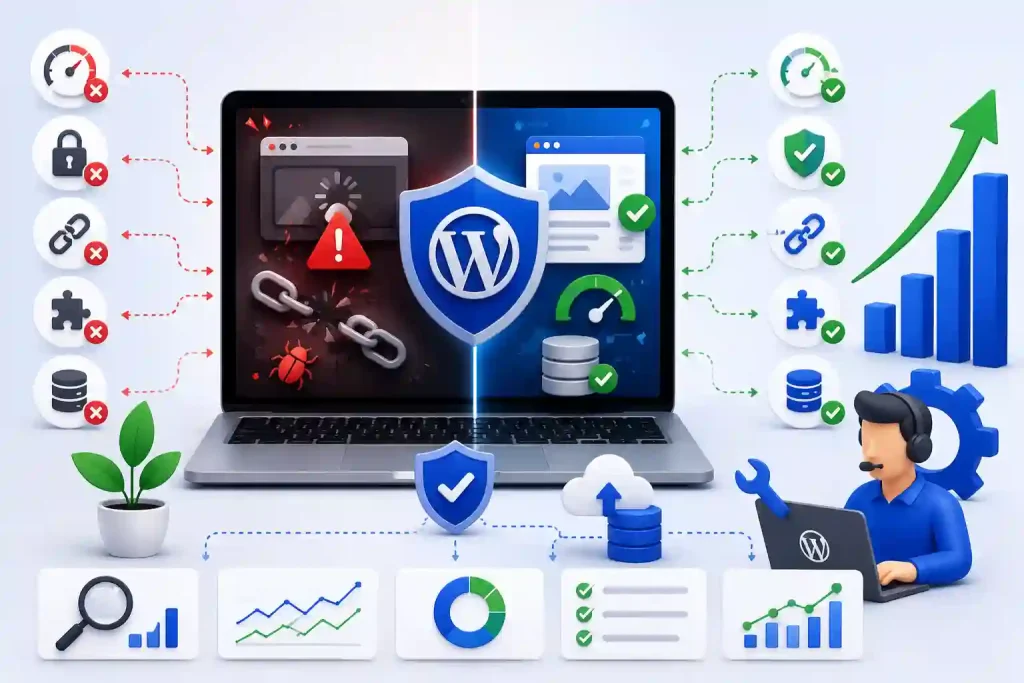
Slow loading speeds also hurt both rankings and conversions because users often leave websites that feel unstable or difficult to use. Broken forms, checkout issues, and failed website functionality can further impact leads, sales, and overall business performance if technical problems remain unresolved.
How WPTasks Solves Recurring WordPress Problems for Businesses and Agencies?
WPTasks helps businesses and agencies handle recurring WordPress issues through monthly maintenance subscriptions and monthly development hour retainers. The platform supports ongoing technical fixes, troubleshooting, website improvements, and recurring development tasks to help keep websites stable and functional in the long term.

WPTasks also provides white-label support for agencies and includes hosting to improve website management and technical stability. Its proactive support approach helps reduce downtime, plugin conflicts, speed issues, security risks, and recurring technical problems before they begin affecting SEO, traffic, or customer experience.
Website Problems Slowing You Down?
Get expert WordPress help to fix errors, improve performance, handle updates, and keep your site running without stress.
The Most Common WordPress Problems Support Can Fix
Technical website issues often start small but can slowly affect SEO rankings, conversions, user experience, and overall website stability. Many businesses do not realize how much traffic and revenue they lose because of unresolved technical problems running quietly in the background.
Reliable WP support helps identify, troubleshoot, and resolve these recurring issues before they escalate into larger SEO, performance, or security risks. Fast technical fixes also help improve website stability, uptime, and long-term business performance.
Website Downtime and Server Errors
Website downtime and server errors can make pages completely inaccessible to both users and search engines. These issues often occur due to hosting failures, overloaded servers, plugin conflicts, DNS problems, or corrupted website files.
Technical support teams help identify the root cause quickly and restore website accessibility before rankings, traffic, and customer trust decline further. Ongoing monitoring also helps reduce recurring downtime.
Slow Page Speed and Failing Core Web Vitals Scores
Slow websites create a poor user experience and weaken important SEO ranking signals like Core Web Vitals. Heavy plugins, unoptimized databases, large media files, poor caching, and server issues are common causes of slow page load times.
WordPress site support helps optimize website performance by improving caching, cleaning up the database, optimizing images, managing scripts, and performing server-level troubleshooting. Faster websites usually improve both rankings and conversions.
Plugin and Theme Conflicts That Break Site Functionality
Plugin and theme conflicts can break layouts, forms, navigation menus, checkout pages, or important website features after updates or installations. These conflicts often lead to unstable website behavior and a poor user experience.
Technical support teams test compatibility issues, isolate conflicts, and safely restore broken functionality without affecting the rest of the website. Proper troubleshooting also helps prevent recurring compatibility problems later.
Malware Infections, Security Breaches, and Blacklisting
Malware infections and hacked websites can quickly damage SEO rankings, customer trust, and website functionality. Security breaches often result in spam pages, malicious redirects, browser warnings, and indexing issues.
WP support helps remove malware, secure vulnerable areas, restore clean files, and recover website stability after attacks. Ongoing monitoring and security protection also help reduce future hacking risks.
Broken Contact Forms, Checkout Pages, and Lead Capture Features
Broken forms and checkout systems can directly affect leads, sales, and customer communication without businesses realizing the full impact immediately. These problems often occur due to plugin conflicts, failed updates, or server-side issues.
Technical support helps restore forms, payment systems, integrations, and lead-capture functionality quickly, before conversion losses become more serious. Continuous testing also helps maintain website usability in the long term.
Failed WordPress Updates That Crash the Site
WordPress updates can sometimes trigger compatibility issues, white-screen errors, broken layouts, or full website crashes when plugins, themes, or server environments are not properly configured.
Support teams safely troubleshoot failed updates, restore backups when needed, and stabilize website functionality after crashes. Managed update processes also help reduce future update-related problems.
Database Errors and Instability Behind the Scenes
Database issues often remain hidden in the background while slowly affecting website speed, functionality, search visibility, and overall performance. Corrupted database tables, overloaded queries, and poor optimization can create technical instability.
WordPress website support helps repair database errors, optimize performance, clean unnecessary data, and improve long-term website stability. Proper database management also reduces recurring speed and functionality issues.
Mobile Display Problems and Poor User Experience
Mobile display issues can make websites difficult to navigate, slow to load, or visually broken across smartphones and tablets. Poor mobile usability negatively affects both SEO rankings and customer experience.
Technical support teams help fix responsive design issues, mobile layout problems, usability errors, and device compatibility concerns. Better mobile performance improves engagement, conversions, and overall search visibility.
SEO Issues That Usually Require Technical WordPress Support
Many SEO problems are caused by technical website issues in the background, not by weak content alone. If these technical errors persist for too long, they can gradually reduce search visibility, crawlability, rankings, and overall website performance.
Technical WP support helps identify and fix these issues before they create larger SEO and traffic problems. Ongoing monitoring and troubleshooting also help maintain long-term website stability and indexing health.
- Crawl Errors: Crawl issues can prevent search engines from correctly indexing important website pages.
- Duplicate Content: Poor canonical settings and duplicate pages can confuse search engines and affect rankings.
- Slow Page Speed: Server issues and heavy plugins often reduce Core Web Vitals performance and website speed.
- Google Blacklisting: Malware infections and security issues can trigger search engine warnings and reduced visibility.
- Broken Redirects: Incorrect redirects and 404 pages weaken SEO authority and user experience.
Warning Signs Your WordPress Site Needs Professional Support Now
Many technical website problems continue growing quietly in the background until they begin affecting SEO rankings, traffic, conversions, and customer experience. Identifying these warning signs early helps businesses prevent larger technical failures and long-term website instability.
Professional support becomes important when recurring issues consistently affect website performance, search visibility, security, or functionality.
- Frequent Downtime: The website goes offline or experiences server issues multiple times each month.
- Traffic Drops After Updates: Rankings or organic traffic decline after plugin, theme, or WordPress updates.
- Broken Forms or Checkout: Contact forms, payment systems, or lead capture features stop working properly.
- Security Warnings: Google Search Console or your browser displays malware or unsafe website warnings.
- Recurring Plugin Conflicts: Website functionality breaks repeatedly after updates or plugin installations.
- Slow Website Performance: Pages continue to load slowly despite basic optimization and caching efforts.
How Ongoing WordPress Support Prevents Problems Before They Start?
Ongoing website support helps businesses detect and fix technical issues before they begin affecting SEO rankings, website stability, traffic, or customer experience. Proactive monitoring, security management, performance optimization, and preventive maintenance reduce the chances of sudden website failures and recurring technical problems.
Consistent technical oversight also improves long-term website reliability, uptime, and search visibility while helping businesses avoid costly emergency fixes later.
Proactive Uptime Monitoring and Instant Alerts
Continuous uptime monitoring helps detect downtime, server instability, and website outages before they affect users or search engines for long periods. Instant alerts enable support teams to begin troubleshooting quickly before larger SEO or performance issues develop.
Early detection significantly reduces traffic loss, indexing problems, and customer frustration during technical failures. Proactive monitoring also helps businesses maintain stronger website reliability over time.
Safe Plugin and Theme Updates With Staging Tests
Plugin and theme updates can sometimes cause compatibility issues, broken layouts, or broken website functionality if changes are pushed directly to the live website. Testing updates in staging environments helps significantly reduce these risks.
Ongoing WordPress support ensures updates are reviewed, tested, and deployed safely without affecting important website features. This process helps maintain website stability while reducing update-related crashes and technical issues.
Continuous Security Scanning and Malware Prevention
Regular security scans help identify vulnerabilities, suspicious activity, malware infections, and unauthorized changes before they create larger technical or SEO problems. Preventive monitoring reduces the chances of websites being hacked or blacklisted by search engines.
Ongoing security management also strengthens website protection by implementing firewalls, strong login security, malware cleanup, and vulnerability patching. Strong security systems improve long-term website trust and technical stability.
Regular Performance Audits and Speed Improvements
Website speed and performance issues often develop gradually due to heavy plugins, poor optimization, database bloat, or server issues. Regular audits help identify these bottlenecks before they begin affecting rankings and user experience.
Performance optimization improves Core Web Vitals, page speed, mobile usability, and overall website responsiveness. Faster websites usually experience better engagement, conversions, and search visibility.
Automated Backups and Fast Disaster Recovery
Reliable backups help businesses quickly recover website files, databases, and configurations after crashes, malware attacks, or failed updates. Automated backup systems reduce downtime and improve recovery speed during emergencies.
Fast disaster recovery also helps protect SEO rankings, customer data, and important website functionality after technical failures. Consistent backup verification ensures recovery systems work properly when needed most.
What to Look for When Choosing a WordPress Support Provider?
Choosing the right support provider is important because technical issues can quickly affect SEO, website stability, conversions, and customer trust. A reliable provider should offer fast response times, proactive monitoring, technical troubleshooting, security management, and ongoing website maintenance.
Look for providers with clear communication and reliable backup systems. They should have experience handling downtime, plugin conflicts, malware recovery, and speed issues. The best support teams focus on preventing recurring problems before they affect website performance and search visibility.
Conclusion
Technical website problems can quietly damage SEO rankings, traffic, conversions, and customer trust long before businesses notice the real impact. Issues like downtime, plugin conflicts, malware infections, slow performance, and broken functionality often continue to grow when they are not monitored or addressed early.
Reliable website support helps businesses identify, troubleshoot, and prevent these recurring problems before they affect long-term website stability and search visibility. Proactive monitoring, security management, performance optimization, and ongoing technical support all play an important role in keeping websites stable, secure, and optimized for growth.
FAQs
What problems can WP support fix?
WP support can help fix downtime, plugin conflicts, malware infections, slow website speed, broken forms, failed updates, database issues, and website security problems.
Can a WordPress site improve SEO performance?
Yes, technical support helps improve SEO by fixing crawl errors, speed issues, broken pages, malware problems, and website instability that affect rankings and search visibility.
How does website support help prevent downtime?
Ongoing monitoring, proactive troubleshooting, server checks, and faster technical response help reduce downtime and website outages before they become larger problems.
Why do plugin conflicts keep happening on WordPress websites?
Plugin conflicts usually occur due to compatibility issues, outdated software, poor coding practices, or failed updates across themes, plugins, and WordPress core files.
How quickly should technical website issues be fixed?
Technical issues should be fixed as quickly as possible because delays can affect SEO rankings, user experience, conversions, and overall website stability.
Why is ongoing WordPress support important for businesses?
Ongoing support helps businesses prevent recurring technical issues, improve website security, maintain faster performance, reduce downtime, and protect long-term SEO performance.


